Buying, managing, or inheriting real estate in Tamil Nadu can feel overwhelming if you are unfamiliar with local land terminology. The state’s land administration system combines historic revenue records with modern digital portals. Whether you are verifying a plot before making an advance payment, applying for a home loan, or updating records after a property registration, knowing how the Patta Chitta system works is essential.
This detailed guide walks you through every aspect of Tamil Nadu’s land records system. We will cover the history and merger of Patta and Chitta, step-by-step portal navigation, online transfer workflows, regional unit conversions, critical Supreme Court rulings, and essential legal due diligence.
1. Understanding Patta Chitta: Definitions, History, and Land Types
1.1 What is Patta Chitta and How Was It Consolidated?
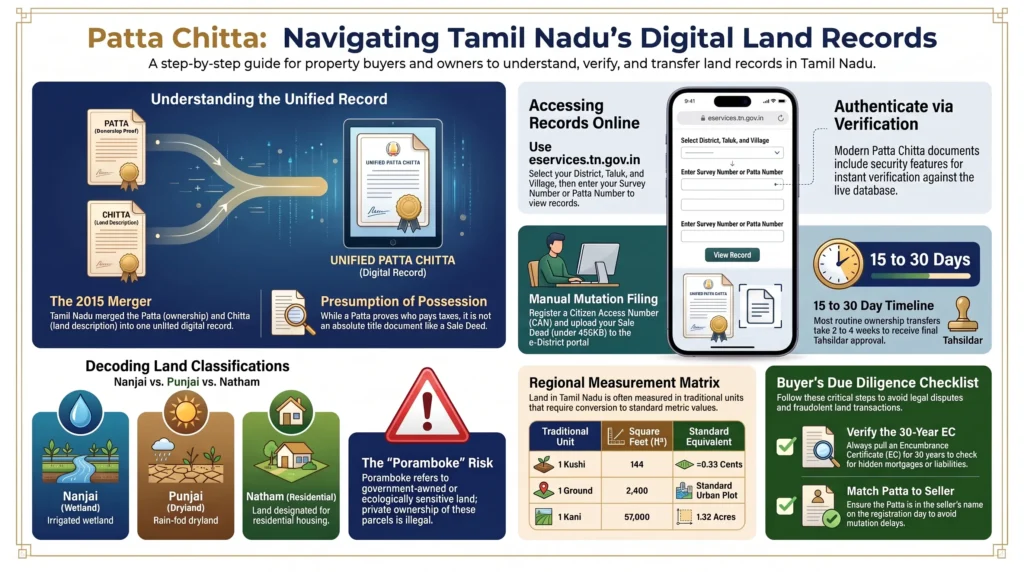
The Historical Distinction and 2015 Registry Merger
Before digital reforms swept across the state, land records in Tamil Nadu were maintained in separate physical paper ledgers by local revenue officers. Landowners and prospective buyers had to visit Taluk offices in person and coordinate directly with Village Administrative Officers (VAOs) to review entries.
Historically, a Patta and a Chitta performed two distinct administrative functions:
- Patta: Issued by the Revenue Department as a formal Record of Rights (RoR), the Patta identified the person recognized as the legal taxpayer in possession of a specific land parcel. It detailed crucial identifiers such as the owner’s name, unique Patta number, survey and subdivision numbers, land area, and local administrative jurisdiction (district, taluk, and village).
- Chitta: A village-level revenue ledger maintained by the VAO that tracked the land’s ecological and agricultural characteristics, distinguishing between wet agricultural tracts (Nanjai) and drylands (Punjai) based on local water resources.
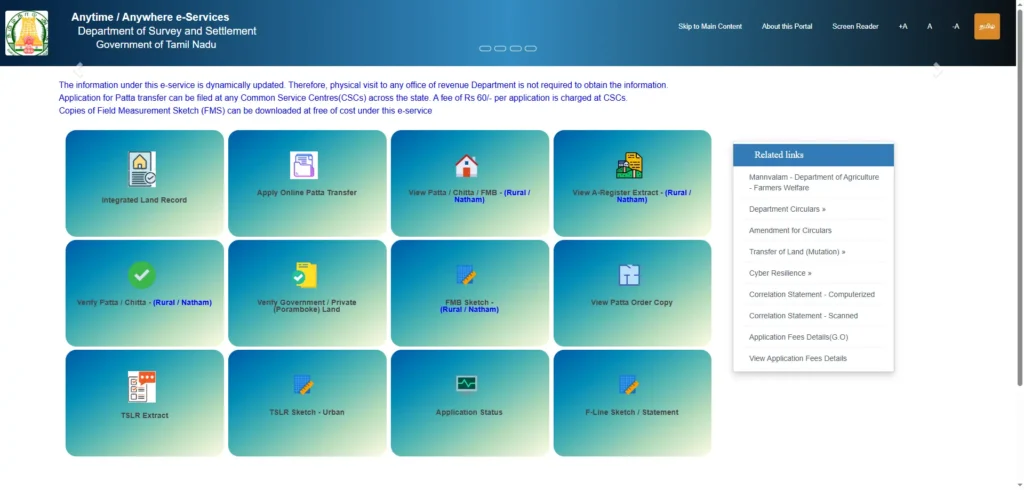
In 2015, the Government of Tamil Nadu merged these two separate registries into a single unified record known as the Patta Chitta (or Patta Passbook). This merger eliminated discrepancies across overlapping village registers and simplified land verification into a single online extract available at eservices.tn.gov.in.
Specialized Usufructuary Records: 2C Patta Chitta
In addition to standard land records, the state digitizes specialized historical holdings such as the 2C Patta Chitta. This specific document records usufructuary rights, granting an individual the legal right to harvest produce from trees standing on government or communal land without transferring ownership of the land itself.
1.2 Legislative Land Classifications and Transfer Restrictions
Nanjai, Punjai, Natham, Kovil, and Poramboke Lands
The revenue category recorded on a Patta Chitta directly dictates a property’s commercial valuation, development potential, and legal transferability:
- Nanjai (Wetland): Lands with access to natural or state-maintained canal, river, or lake irrigation. Due to agricultural preservation policies, converting Nanjai land for residential or commercial construction requires strict state-level land-use conversion approvals.
- Punjai (Dryland): Lands dependent on seasonal rainfall or localized borewells. While categorized as agricultural, Punjai property is generally easier to convert for non-agricultural development.
- Natham (Manai / Residential): Land historically designated for housing settlements in rural villages. Natham land is exempt from agricultural conversion restrictions, making it suitable for residential building layout approvals.
- Kovil Lands (Temple Property): Property owned by temples or religious institutions managed under the Hindu Religious and Charitable Endowments (HR&CE) Department. These lands are legally protected and cannot be sold, transferred, or mortgaged without explicit HR&CE Department authorization.
- Poramboke Land (Government/Communal Grounds): State-owned, communal, or ecologically sensitive areas such as lakes, riverbeds, roads, and grazing reserves (Meikkal Poramboke). Issuing a private Patta over Poramboke land is strictly illegal, and any such document is void and subject to summary cancellation and eviction.
Summary Matrix of Land Classifications
| Land Classification | Revenue Category Name | Primary Irrigation Source | Legal Transferability | Permissible Development Uses |
|---|---|---|---|---|
| Wetland | Nanjai | Canals, rivers, reservoirs | Restricted; requires state land-use conversion clearance | Intensive agriculture; conversion allowed only with state permits |
| Dryland | Punjai | Rainfed or localized borewells | Generally transferable; subject to local planning approvals | Dry cultivation; eligible for residential or commercial conversion |
| Residential Plot | Natham / Manai | Non-irrigated housing sites | Fully transferable without conversion requirements | Residential housing, municipal layouts, and local infrastructure |
| Temple Land | Kovil | Institutional / Agricultural | Highly restricted; requires explicit HR&CE Department clearance | Institutional uses; commercial leasing under strict state guidelines |
| Government Land | Poramboke | Protected natural features (e.g., lakes) | Strictly non-transferable to private parties | Public utilities, environmental conservation, municipal infrastructure |
2. Step-by-Step Online Guide: Viewing, Downloading, and Verification
2.1 Retrieving Rural Patta Chitta and Urban TSLR Extracts
Rural Land Portal Navigation (eservices.tn.gov.in)
Viewing and downloading a rural Patta Chitta extract is free on the official state portal:
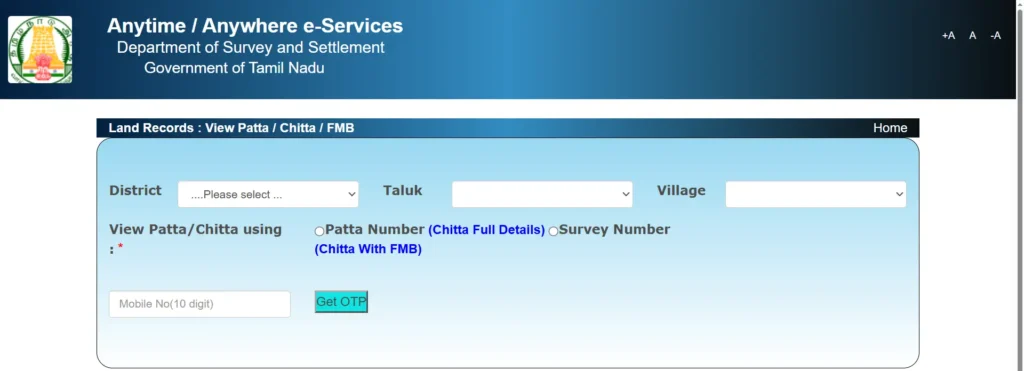
- Visit the official portal at
eservices.tn.gov.inand select “View Patta/Chitta”. - Choose Rural as the land category, then select your District, Taluk, and Village from the drop-down menus.
- Choose your search preference: Patta Number or Survey and Subdivision Number.
- Solve the CAPTCHA, enter a valid mobile number, and authenticate using the One-Time Password (OTP) sent via SMS.
- The digital Patta Chitta extract will generate on screen, ready to view, print, or save as a PDF.
Urban Property Extraction (Town Survey Land Register – TSLR)
Properties located within municipal corporations or town survey boundaries (such as Chennai, Coimbatore, or Madurai) are managed under the Town Survey Land Register (TSLR) rather than rural survey registers:
- Select “Urban” on the e-Services menu.
- Select your urban parameters: Corporation/Town, Ward, Block, and Town Survey Number.
- Complete CAPTCHA and OTP verification to view and download your digital TSLR Extract.
2.2 Verifying Document Authenticity and Mobile Integration
Verification Module & QR Code Validation
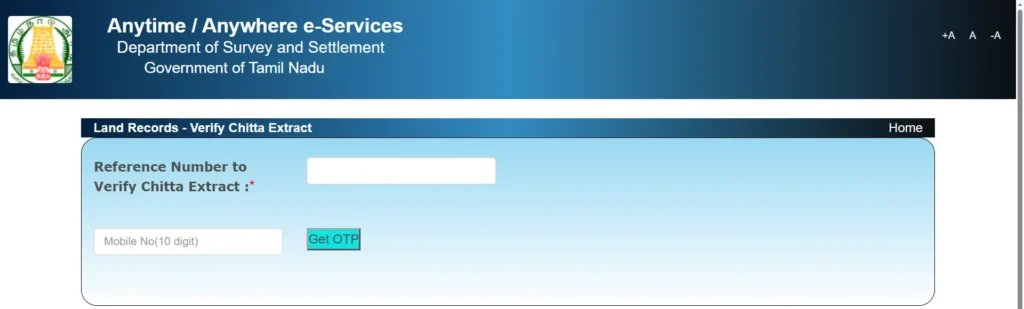
To protect against forged land records in property deals, buyers should independently verify any document extract online:
- Navigate to the “Verify Patta/Chitta” module on
eservices.tn.gov.in. - Enter the unique alphanumeric reference number printed on the document footer.
- Alternatively, scan the embedded QR code using a smartphone to be redirected to the live government database verification page.
Mobile Ecosystem and Advanced Land Intelligence (ALI)
Backend operations are powered by TamilNilam (Tamil Nadu Land Information Management) in tandem with the Comprehensive Land Information Portal (CLIP). Third-party applications like “Tamil Nadu Land Connect” combine these public databases with Geographical Information System (GIS) mapping. Using features like Advanced Land Intelligence (ALI), users can tap directly on a digital map to retrieve active survey numbers, review Field Measurement Book (FMB) cadastral sketches, and check planning permissions from CMDA, DTCP, or TNRERA.
3. Online Patta Transfer & Mutation Protocol (Chitta Muttral)
3.1 Auto-Mutation vs. Manual Application Workflows
Post-Registration Auto-Mutation Triggers
When a land purchase meets specific criteria, the revenue system triggers an Auto-Mutation workflow:
- Prerequisites: The seller holds an individual Patta, the transaction covers the entire land parcel (no subdivision), and land boundaries remain unchanged.
- Execution: Data transfers automatically from the Sub-Registrar Office (SRO) registration system to TamilNilam, updating the Patta in the buyer’s name within hours of deed registration without extra charges.
Manual Patta Transfer Steps & Document Checklist
If a transaction involves partial plot purchases (requiring subdivision), inheritance, partition deeds, or joint holdings, buyers must submit a manual Patta transfer application:
- CAN Registration: Register a Citizen Access Number (CAN) on the e-Sevai / e-District portal by linking Aadhaar details and demographics in English and Tamil.
- Application Filing: Log in, select “Apply Online Patta Transfer”, and input the property location, survey particulars, and transfer reason (sale, gift, or inheritance).
- Document Upload: Upload the document checklist in PDF format.
- Physical Survey & Verification: The local VAO verifies village records, while the Revenue Inspector or Assistant Surveyor conducts an on-site survey to update Field Measurement Book (FMB) maps.
- Approval: The Tahsildar digitally signs and issues the updated Patta.
3.2 Technical Specifications, Fees, and Timelines
Technical Upload Constraints and Fee Structure
- File Format & Size: Uploads must be in PDF format, strictly under 400 KB per file.
- Required Document Checklist:
- Registered Sale Deed, Partition Deed, or Legal Heirship Certificate.
- Schedule of property establishing boundary details.
- Reverse registration page displaying Sub-Registrar Office (SRO) seals and dates.
- Encumbrance Certificate (EC) verifying active liabilities.
- Proof of active possession (recent property tax receipts or utility bills).
- Aadhaar card or PAN card of the applicants.
- Fee Structure: Online portal applications cost ₹100 to ₹300, while filing via a Common Service Centre (CSC) incurs an additional ₹60 service charge.
Processing Workflows and Administrative Channels
| Digital Workflow | Required Identifiers | Document Format and File Limits | Associated Fees | Standard Processing Timeline | Key Deliverables |
|---|---|---|---|---|---|
| Viewing & Downloading Patta Chitta | District, Taluk, Village, Survey/Subdivision No. or Patta No. | Dynamic Screen View; PDF direct print | Free of charge | Instantaneous | View-only PDF extract of Patta Chitta |
| Urban TSLR Extract | Corporation/Town, Ward, Block, Town Survey No. | Dynamic Screen View; PDF direct print | Free of charge | Instantaneous | Digital TSLR urban plot extract |
| Verify Patta Authenticity | Alphanumeric Reference Number or QR code | QR-code URL redirect or reference code check | Free of charge | Instantaneous | Verification confirmation matching database |
| Auto-Mutation | Automatic trigger post-registration at SRO | Automated data transfer; no upload | Free of charge | Within hours of registration | Automatically mutated Patta |
| Manual Patta Transfer Application | CAN Number, registered deed, property details | PDF only; strictly under 400 KB per file | ₹100 – ₹300 (plus ₹60 at CSC) | 15–30 days (up to 36 weeks for inheritance) | Updated Tahsildar-approved Patta |
4. Regional Land Area Measurements and Conversion Ratios
Land records and property documents may use traditional, colonial-era, and modern metric units. When verifying property boundaries, title deeds, survey records, or historical documents, it is important to convert these units carefully and to account for regional variations in customary measurements.
4.1 Traditional Tamil Measurement Units
Kuzhi, Ma, Kani, and Veli
The following traditional Tamil area hierarchy is commonly used in certain historical and regional land-measurement contexts:
| Traditional Unit | Equivalent |
|---|---|
| 1 Veesam | 36 sq ft |
| 1 Kuzhi | 4 Veesams = 144 sq ft |
| 1 Ma | 100 Kuzhis = 14,400 sq ft |
| 1 Kani | 4 Mas = 400 Kuzhis = 57,600 sq ft |
| 1 Veli | 5 Kanis = 20 Mas = 288,000 sq ft |
Based on these definitions:
- 1 Veesam = 36 sq ft (approximately 3.34 m²)
- 1 Kuzhi = 144 sq ft (approximately 13.38 m²)
- 1 Ma = 14,400 sq ft (approximately 1,337.80 m²)
- 1 Kani = 57,600 sq ft (approximately 5,351.21 m² or 1.3223 acres)
- 1 Veli = 288,000 sq ft (approximately 26,756.07 m² or 6.6116 acres)
Traditional Linear Measurements
Historical land and survey documents may also refer to linear units such as the Link and Chain.
- 1 Link = 0.66 ft (7.92 inches)
- 100 Links = 1 Chain = 66 ft
The term Kejam/Gajam is commonly associated with a square yard in land measurements:
- 1 Kejam/Gajam = 1 square yard = 9 sq ft
Because traditional units may have different customary values in different regions and historical records, the unit definition appearing in the original deed or survey record should be given priority when there is a discrepancy.
Urban and Common Land Units
Cent
A Cent is a widely used land-area unit in parts of South India.
- 1 Cent = 435.6 sq ft
- 1 Cent = 40.4686 m²
- 100 Cents = 1 Acre
Ground
A Ground is commonly used in property measurements, particularly in Tamil Nadu.
- 1 Ground = 2,400 sq ft
- 1 Ground ≈ 222.97 m²
- 1 Ground ≈ 5.5096 Cents
- 1 Ground ≈ 0.0551 Acre
Dismil / Decimal
The terms Dismil and Decimal are commonly used for small land areas in parts of India. In the standard acre-based conversion:
- 1 Dismil = 1/100 Acre
- 1 Dismil = 435.6 sq ft
- 1 Dismil = 1 Cent
- 1 Dismil ≈ 40.4686 m²
Therefore:
- 2.5 Dismils = 1,089 sq ft
- 2.5 Dismils = 2.5 Cents
The terms Dismil, Decimal, Cent, and other customary units may be used differently in local documents. Always verify the definition used by the relevant revenue or registration authority.
4.2 Comprehensive Area Conversion Matrix
The following table provides mathematical conversions based on the unit definitions stated above:
| Unit | Square Feet (ft²) | Square Meters (m²) | Cents | Grounds | Acres | Hectares |
|---|---|---|---|---|---|---|
| 1 Veesam | 36.00 | 3.3445 | 0.0826 | 0.0150 | 0.0008 | 0.0003 |
| 1 Kuzhi | 144.00 | 13.3781 | 0.3306 | 0.0600 | 0.0033 | 0.0013 |
| 1 Cent | 435.60 | 40.4686 | 1.0000 | 0.1815 | 0.0100 | 0.0040 |
| 1 Ground | 2,400.00 | 222.9673 | 5.5096 | 1.0000 | 0.0551 | 0.0223 |
| 1 Ma | 14,400.00 | 1,337.8129 | 33.0579 | 6.0000 | 0.3306 | 0.1338 |
| 1 Kani | 57,600.00 | 5,351.2515 | 132.2314 | 24.0000 | 1.3223 | 0.5351 |
| 1 Acre | 43,560.00 | 4,046.8564 | 100.0000 | 18.1500 | 1.0000 | 0.4047 |
| 1 Hectare | 107,639.10 | 10,000.0000 | 247.1054 | 44.8496 | 2.4711 | 1.0000 |
| 1 Veli | 288,000.00 | 26,756.0710 | 661.1570 | 120.0000 | 6.6116 | 2.6756 |
Important Note on Traditional Measurements
Traditional land units are not universally standardized across all districts and historical periods. Terms such as Kuzhi, Ma, Kani, Veli, Veesam, and Kejam may have different customary meanings depending on the locality and the document’s period.
For legal or property-verification purposes, conversions should therefore be treated as reference calculations rather than a substitute for the measurements recorded in an official survey, title deed, patta, or revenue record. Where two records use different definitions for the same traditional unit, the applicable local revenue and survey standards should be consulted.
5. Legal Precedents, Due Diligence, and Risk Mitigation
5.1 Patta vs. Title Deed: Key Legal Differences
Madras High Court and Supreme Court Precedents
Confusing a revenue record with an absolute title document is a common and costly error in real estate deals. The Madras High Court and the Supreme Court of India have repeatedly ruled that a Patta is not a title document. It establishes a legal presumption of possession and identifies taxpayer liability, but it is not conclusive proof of legal ownership.
Why Sale Deeds and Revenue Records Must Align
Establishing clear legal title requires an unbroken chain of registered transfer deeds (sale, gift, partition, or inheritance deeds) recorded with the Registration Department via TNREGINET going back at least 30 years.
- Holding an updated Patta without a continuous sale deed chain leaves the title open to civil court challenges.
- Holding a registered sale deed without updating the Patta prevents buyers from securing municipal building approvals, securing utility connections, or using the land as bank loan collateral.
5.2 Landmark Supreme Court Ruling: K. Gopi Case (2025)
Sub-Registrar Authority and Rule 55A(i) Strike Down
In K. Gopi v. The Sub-Registrar (2025 INSC 462), the Supreme Court of India examined property registration practices originating from a Tamil Nadu Sub-Registrar’s office. The Supreme Court struck down Rule 55A(i) of the Tamil Nadu Registration Rules—which previously allowed Sub-Registrars to refuse sale deed registration if the seller could not present original parent title documents—declaring it ultra vires the Registration Act, 1908.
The court affirmed that a registering officer performs a procedural function (verifying identities, execution, and stamp duty) and lacks adjudicatory authority to decide title validity or demand original parent deeds as a precondition for registration.
Buyer Due Diligence after the K. Gopi Judgment
Because Sub-Registrars can no longer demand original parent title deeds during registration, the burden of verification falls entirely on the buyer. Buyers must independently examine both the 30-year registered sale deed chain on TNREGINET and the active Patta Chitta extract on e-Services to ensure clear title.
5.3 Government Land Encroachments and Poramboke Verification
Water Body Risks and Summary Evictions
A significant risk in land purchases involves the fraudulent conversion of Poramboke land (government-owned, communal, or ecologically protected areas such as lakes, riverbeds, and grazing reserves).
Due to corrupt intent or administrative errors, Poramboke parcels have sometimes been assigned private Pattas. Following a 2015 Madras High Court directive, the state actively cancels Pattas issued over water bodies (Full Tank Level boundaries) and reclaims encroached lands.
Tamil Nadu Land Encroachment Act, 1905 and Section 14 Civil Bar
When the government identifies private encroachments on Poramboke land, it issues summary eviction notices under the Tamil Nadu Land Encroachment Act, 1905. Under Section 14 of this Act, civil courts lack jurisdiction to block these state eviction proceedings.
Because an erroneously issued Patta offers no legal defense against state eviction, buyers must verify every property against the “Verify Government / Private (Poramboke) Land” feature on eservices.tn.gov.in before paying advance funds or executing a sale deed.
Frequently Asked Questions (FAQs)
Is Patta Chitta the same as a registered Sale Deed?
No. A registered Sale Deed proves that a transaction occurred under civil law, whereas a Patta Chitta confirms who the Revenue Department recognizes as the possessor and taxpayer for that land parcel. Both documents are required for complete ownership security.
What is the difference between Rural Patta Chitta and Urban TSLR Extracts?
Rural land is tracked via rural survey numbers on the Patta Chitta register. Urban properties within municipal corporation limits are managed under the Town Survey Land Register (TSLR), which issues TSLR Extracts organized by Ward, Block, and Town Survey numbers.
How long does a manual Patta transfer take in Tamil Nadu?
Manual Patta transfers for standard property purchases take 15 to 30 days following VAO and surveyor inspections. Inheritance cases involving legal heirs or partition deeds can take up to 36 weeks.
Can a home loan be approved without a Patta in the buyer’s name?
Generally no. Banks and financial institutions require an updated Patta Chitta alongside a 30-year Encumbrance Certificate (EC) to verify clear, unencumbered ownership before disbursing loan funds.
How can buyers verify if a land parcel is classified as Poramboke?
Buyers can use the “Verify Government / Private (Poramboke) Land” feature on eservices.tn.gov.in by entering the district, taluk, village, and survey number. If classified as Poramboke, the property is non-transferable government land.
Conclusion and Key Takeaways
Digitizing the Patta Chitta registry has transformed land administration in Tamil Nadu, making records far more transparent and accessible through automated systems like TamilNilam. However, because a Patta functions as a presumption of possession rather than an absolute title document, buyers must conduct thorough, independent title searches across both revenue and registration portals.
To ensure a legally secure land transaction in Tamil Nadu:
- Dual Registry Search: Cross-reference your active Patta Chitta extract with a 30-year registered sale deed search on TNREGINET.
- Verify Government Status: Check every survey number on the e-Services Poramboke database to confirm the property does not overlap with protected state land or water bodies.
- Monitor Auto-Mutation: Follow up on the portal within 48 hours of deed registration; if auto-mutation does not trigger, file a manual application immediately.
- Match Jurisdictional Systems: Ensure urban plots are verified using TSLR extracts rather than outdated rural survey numbers.